

Rarity Market
Drakoria's depot market in the client — the normal Thais depot market plus full rarity trading.
The Rarity Market is Drakoria's depot market inside the client — the same market you use for everyday items from your shared Thais depot, extended with full support for rarity gear (attributes, item level, and upgrade tier). Sell normal stackables or rolled rarity equipment and get paid in gold or premium points. Offers stay live for 7 days, so buyers can purchase while you are hunting or logged out.
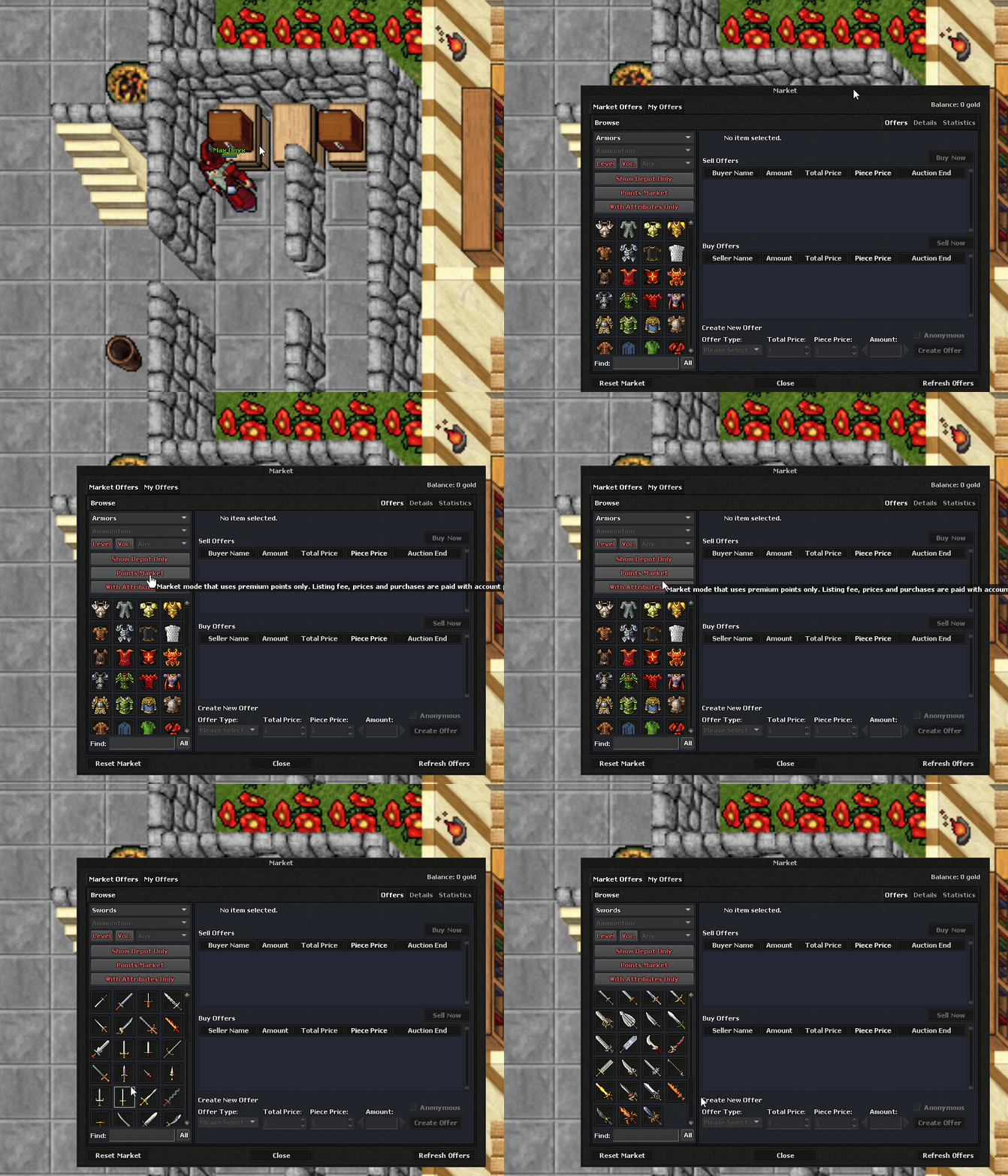
Depot market (normal + rarity)
Open the Market window from any temple depot chest. It works like a classic OT depot market for normal items, and adds rarity filters, attribute previews, and premium-point listings for end-game gear.
- Normal items — stackables and standard equipment straight from your shared Thais depot.
- Rarity gear — Common, Rare, Epic, and Legendary items with rolled bonus attributes.
- Upgraded items — gear with +tier upgrades (+1 through +9) and enchant slots.
- Leveled equipment — items with an Item Level tied to the monster or content they dropped from.
- Buy & sell orders — post WTS (want to sell) or WTB (want to buy) listings like a classic market.
Need help understanding rarity tiers and gems? Read the full Rarity System guide.
Gold market vs. points market
| Mode | Currency | Listing fee | Best for |
|---|---|---|---|
| Standard Market | Gold (bank balance) | 1% of total price (min 20 gp, max 100,000 gp) | Everyday items, supplies, stackables, normal gear |
| Premium Points Market | Website store points | 1 point per listing | High-value rarity items, end-game gear, cross-player point trades |
- Gold sales pay out to your bank account. Purchases also draw from bank balance.
- Point sales credit the seller's website store points (same balance used in the Game Store).
- Switch between gold and points tabs inside the client market window — each tab shows its own active offers.
How to sell (in-game)
- Visit any temple and open your shared Thais depot chest.
- Place the items you want to list inside the depot (rarity items must stay in depot storage).
- Open the Market window from the depot UI in the Drakoria Client.
- Choose Gold or Points, pick the item, set price and amount, then confirm.
- For rarity listings, use the client's With Attributes / Rarity filters to preview item level, tier, and bonus stats before posting.
Premium account is not required to create market offers on Drakoria.
How to buy
- Open Market from any depot and browse or search by item name.
- Filter by category, gold vs. points, or rarity-only listings when hunting gear with specific attributes.
- Purchases complete instantly — items go to your depot and payment is taken from bank gold or your point balance.
- Inspect rarity rows for Common / Rare / Epic / Legendary labels, item level, upgrade tier, and attribute text before you buy.
Trade while hunting or offline
- Once posted, your offers remain visible to every player for 7 days (server default).
- You do not need to stand at the depot or stay online — sales complete automatically and gold/points are delivered to your account.
- If an offer expires or you cancel it, recover unsold items through the client recover option (same as the classic depot market).
- Anonymous listings hide your character name on the public offer row.
Rarity item details on listings
| Field | What it means |
|---|---|
| Rarity tier | Common, Rare, Epic, or Legendary — determines how many bonus attributes the item rolled. |
| Item Level | Base power of the piece (higher level = stronger enchant caps). Shown on rarity market rows. |
| Upgrade tier | +n upgrade level from blue rarity gems (+1 to +9). |
| Attributes | Rolled bonuses such as Max HP, Magic Level, Critical Hit, Physical Protection, Speed, Luck, and dozens more. |
- The client scans your depot for rarity items and sends attribute summaries to the market UI (same data the website rarity guide describes).
- Unidentified rarity items must be identified before they show full stats on listings.
Quick reference
| Setting | Value |
|---|---|
| Offer duration | 7 days |
| Depot storage | Shared Thais depot (1,000 slots free / 2,000 premium) |
| Max active offers | 100 per character (server default) |
| Premium required to list | No |
| Payment options | Gold or Premium Points |